You've probably heard of MCP - the Model Context Protocol - in the context of AI agents getting access to external tools. But the part that actually does the work is the MCP server: the service that sits between your AI application and your real systems, and makes the connection possible.
Here's what that looks like in practice.
The problem MCP was built to solve
AI applications - whether that's Claude, ChatGPT, or your own internal agent - are powerful at reasoning, but isolated by default. They can only work with what you put in the prompt.
Want an agent to look up a customer record? You'd have to copy-paste it in. Want it to trigger a workflow? You'd need to build a one-off integration. Want to swap the model next quarter? Rebuild everything.
MCP solves all three problems at once by standardising how AI applications connect to the outside world.
What an MCP server actually is
An MCP server is a lightweight service that exposes your system - a database, an API, a file system, a SaaS tool - to any AI application that speaks the protocol. Think of it as a USB-C port for AI: a single standard connector that works with any device on either end.
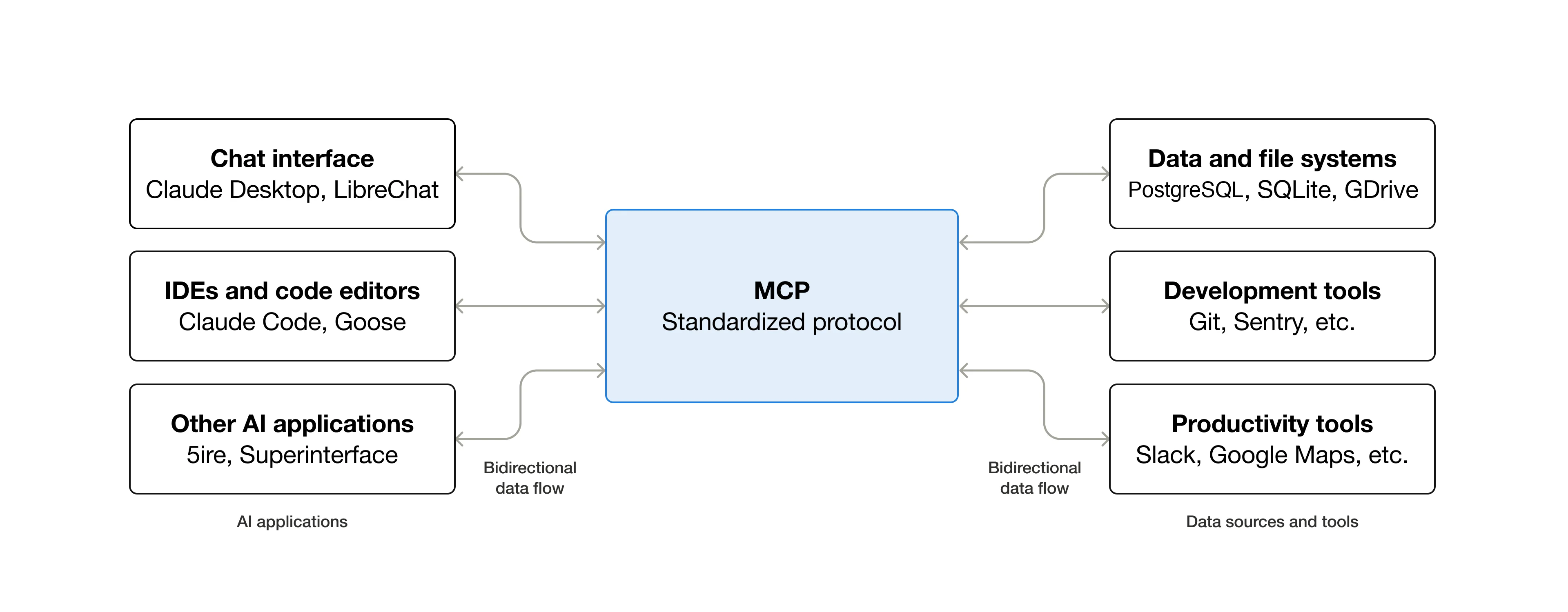
On the left, your AI applications - Claude Desktop, VS Code with Copilot, custom agents, or enterprise chatbots. On the right, your data and tools: databases, file systems, Git, Slack, Google Maps, whatever your workflow runs on.
The MCP server sits in the middle and handles the translation in both directions.
What MCP servers expose
Every MCP server defines a set of capabilities it offers to connected AI applications. These fall into three categories:
- Tools - actions the AI can trigger: create a record, run a query, send a message, execute a function
- Resources - data the AI can read: documents, database rows, file contents, API responses
- Prompts - reusable instruction templates scoped to specific workflows
When an AI application connects to your MCP server, it asks: "What can you do?" The server responds with a structured list. The AI picks the right capability, calls it with the right inputs, and gets a structured result back. No manual copy-pasting. No prompt engineering to extract data. Just a clean, typed interface.
What this enables
Once your systems are behind an MCP server, the use cases open up fast:
- AI assistants can access your calendar, your CRM, your project tracker - acting as a genuinely personalised assistant rather than a stateless chatbot
- Development agents like Claude Code can pull a Figma design and generate a working component, because they can actually see the design file
- Enterprise chatbots can query multiple internal databases in a single conversation, giving users real answers instead of "please contact your administrator"
- Workflow agents can trigger actions in Slack, update records in your database, and log results - completing tasks end-to-end rather than just describing what should happen
Why the server model matters
The critical insight is that the server defines the boundary. Your MCP server decides:
- What the AI can see - only the data you explicitly expose
- What the AI can do - only the tools you define
- Who can connect - only the agents you authorise
This means security isn't an afterthought. You're not giving an AI model raw database access. You're giving it access to a controlled interface that you designed, with auth, scopes, and logging built in.
Why it matters for different people
For developers: MCP eliminates the need to write custom integrations for every model and every use case. Build the server once. Every current and future AI application that speaks MCP can use it without modification.
For AI applications and agents: MCP provides access to a growing ecosystem of servers covering data sources, developer tools, and productivity software. More capability, less plumbing.
For end users: The result is AI that can actually access your data and take actions on your behalf - not a chatbot that tells you to do things yourself.
The broad ecosystem
MCP is an open protocol, and it's already supported across a wide range of clients and servers. Claude, ChatGPT, Visual Studio Code, Cursor, and many other AI tools all speak MCP. That means servers built to the standard work across the ecosystem - build once, integrate everywhere.
The servers themselves cover an equally broad range: PostgreSQL, SQLite, Google Drive on the data side; Git, Sentry, and other dev tools; Slack, Google Maps, and other productivity tools.
Where most teams get stuck
The protocol itself is straightforward. The hard part is building an MCP server that's ready for production - not just a working demo.
A production-grade server needs auth, access controls, structured error handling, rate limiting, and observability. Without those, the demo works and the first real incident is a surprise.
That's the gap most teams run into. We build MCP servers with production hardening included - usually live in weeks, with your team owning the result.